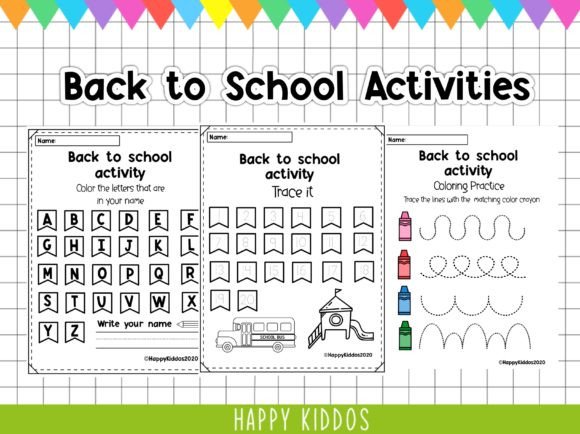
Back to School Activities: Practical, Ready-to-Use Learning Tools for Early Learners
Back to School Activities aren’t just seasonal decorations or calendar markers—they’re intentional, scaffolded learning opportunities designed to ease transitions, reinforce foundational skills, and support developmental milestones. For educators, homeschoolers, curriculum designers, and early childhood professionals, these activities function as modular workflow assets: flexible enough to plug into lesson plans, responsive enough to adapt to individual pacing, and consistent enough to deliver measurable engagement across diverse classroom settings.
This particular digital product set—11 pages in PDF format, delivered as a single ZIP file—serves preschool, kindergarten, and early elementary learners. It’s not a curriculum framework or a long-term scope-and-sequence planner. Instead, it’s a precision tool: focused, printable, and immediately actionable. Because it’s digital, there’s no shipping, no inventory, no physical storage—just instant access, version control, and seamless integration into existing digital workflows.
Where Back to School Activities Fit in the Planning Cycle
Most educators don’t start the year with a blank slate. They begin with goals—social-emotional readiness, letter recognition, fine motor development, classroom routine building—and then layer in resources that serve those goals. Back to School Activities enter this cycle at the implementation stage: after objectives are defined but before daily execution begins. They’re not substitutes for assessment or observation; they’re complements—structured practice materials that translate broad developmental aims into concrete, repeatable tasks.
For example, if your goal is to build name recognition in a mixed-readiness kindergarten group, you’d first assess current skill levels (e.g., tracing vs. independent writing), then select matching worksheets from this set—like “Trace Your Name” or “Match Letters to Objects”—and embed them into morning centers or small-group rotations. The activity doesn’t drive the goal; it supports it, with built-in scaffolding and visual clarity.
Using the Files Before, During, and After Instruction
Before instruction: Use the PDFs to pre-load digital platforms. Upload them to Google Classroom, Seesaw, or Notability for asynchronous warm-ups. Print and laminate key pages (e.g., number tracing sheets) for reusable dry-erase stationery. Organize by skill domain—literacy, numeracy, motor, social—so you can pull targeted sets during weekly planning sessions without re-scanning content.
During instruction: These worksheets work best when paired—not isolated. A “Find the Shape” page gains depth when followed by a hands-on shape hunt around the classroom. A “My First Day Feelings” drawing prompt becomes more meaningful when discussed in a morning meeting. The files provide consistency; your facilitation adds context, differentiation, and responsiveness.
After instruction: Reuse pages for review, progress monitoring, or family engagement. Send home a “Count & Color” sheet as a low-stakes take-home connection. Archive completed versions digitally (with student permission) to track growth over time—especially useful for IEP documentation or portfolio building. Because the files are PDFs, they retain formatting across devices, avoiding layout shifts that compromise usability.
Compatibility and Integration Across Platforms
This set works natively with common edtech ecosystems. Open the PDFs in Adobe Acrobat, Apple Preview, or Chrome for annotation. Import into Canva or PowerPoint to customize instructions or add audio cues for multilingual learners. Convert select pages to PNGs for use in interactive whiteboard software like SMART Notebook or Miro boards during virtual lessons.
No special software is required—but if you use LMS platforms with built-in PDF annotation (e.g., Schoology, Canvas), you’ll maximize efficiency. Avoid converting to editable formats like DOCX unless necessary; the original PDF preserves spacing, fonts, and visual hierarchy—critical for early learners who rely on consistent visual cues.
Practical Implementation Tips for Real Workflows
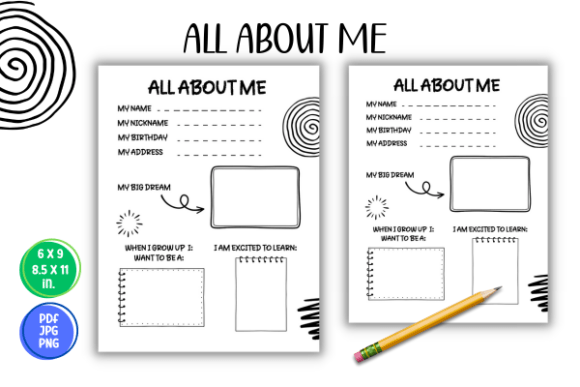
- Batch-print strategically: Don’t print all 11 pages at once. Identify high-leverage pages—like “All About Me” or “Classroom Rules Match-Up”—and print 5–10 copies per class. Store extras in labeled folders (digital and physical) for quick access.
- Prep for differentiation: Use the same worksheet across tiers—e.g., “Color by Number” can be used for numeral ID (Tier 1), simple addition (Tier 2), or skip-counting patterns (Tier 3). Add sticky-note prompts or highlight target sections instead of creating new files.
- Link to standards intentionally: While the set isn’t explicitly aligned to Common Core or state frameworks, each page maps clearly to early learning domains: ECERS-3 indicators for literacy and math, Head Start Early Learning Outcomes Framework (ELOF) domains, or NAEYC guidelines. Keep a quick-reference alignment sheet in your planning binder.
- Preserve longevity: Save the original ZIP file in cloud storage with version naming (e.g., “BackToSchool_Activities_v2024”). Never edit the master file—duplicate and rename before customizing. This ensures you always have a clean source for reprints or sharing with co-teachers.
Organization, Efficiency, and Consistency
Clutter undermines consistency—especially in early learning environments where predictability builds confidence. These worksheets reduce cognitive load for both adults and children because their design follows evidence-based principles: clear visual boundaries, ample white space, minimal distractions, and predictable placement of instructions. That consistency isn’t accidental—it’s engineered for rapid recognition and repeated use.
Organize your digital copy using a nested folder system: Curriculum > BackToSchool > Worksheets > Literacy. Tag files in your cloud service with keywords like “preschool,” “fine-motor,” or “first-week.” That way, when you’re planning on a Sunday afternoon and need “something for pencil control,” a quick search surfaces exactly what you need—no scrolling through unsorted downloads.
Efficiency also comes from reuse. A “Pattern Block Copy” page works for geometry, color sorting, and bilateral coordination. A “Weather Chart” supports science vocabulary, data recording, and calendar routines. Think in terms of functional overlap—not one-to-one task mapping.
Long-Term Use and Quality Control
Digital products age differently than physical ones. There’s no fading ink or torn corners—but there is risk of misplacement, version confusion, or platform obsolescence. Mitigate that by backing up the ZIP file in at least two locations (e.g., Google Drive + external SSD), verifying download integrity annually, and checking compatibility with updated OS versions every 6–12 months.
Quality control starts with how you use the material. Observe which pages generate sustained engagement versus passive compliance. Note where students pause, ask questions, or reach for manipulatives—and use those signals to refine your delivery, not to discard the worksheet. A “low-engagement” moment may point to timing, grouping, or scaffolding—not the resource itself.
Also consider equity of access. If some families lack printers, offer the PDFs via email with clear instructions for viewing on phones or tablets—or convert key pages to simple Google Slides with voice-over narration for auditory reinforcement.
Real-World Workflow Example
A preschool director preparing for August orientation uses three pages from this set across her rollout plan: “All About Me” for intake interviews (families complete it together), “My Classroom Jobs” for visual schedule building, and “Feelings Faces” for staff training on emotion identification. She uploads them to her private staff portal, adds brief facilitation notes (“Ask open-ended questions—don’t correct answers”), and prints laminated copies for parent handouts. Later, she repurposes the “Feelings Faces” page as part of a fall PD session on trauma-informed practices—proving that well-designed Back to School Activities scale beyond their initial context.
That’s the real value: not novelty, but utility. Not volume, but versatility. Not urgency, but endurance.
Back to School Activities succeed when they disappear into the workflow—when they’re so well-integrated, so reliably functional, that you stop thinking about the tool and start focusing on the learner.